Showing posts with label GMLAN. Show all posts

GMLAN SYSTEM & OnStar

  The broad application of the system GMLAN new models of Chevrolet, laying the groundwork for the launch of a new technological era, completely changed the traditional traditional philosophy to date electronic systems. The variety of new electronic systems, is applied to the high demands that are using using integrated software, communications and data transfer.

Basically it is an advanced system possible - Bus which is indicated for use in  vehicles fitted fitted with high-tech systems (ESP, AWD, TCM, etc.).

The current exchange of information between electronic control units are made different by using separate cables. The disadvantage in this case back to the fact that due to the the increased amount of information needed to be, increasing the number of wires, thus increasing the electrical potential damage.
The highly innovative features of the system to transfer data GMLAN day. The data can be simulated with a wagon. In the same way that a car carrying a large number of people in in these destinations, so the data transfer is handled a large number of units of information between different electronic control (exchange data). The data exchange between between electronic control unit allows the unit acts as a single operating system. The more information get an electronic control system, the more fully implement the functionality of its its own independence.
The advantages of using the data transmission system - the data bus is:At the sensor and signal cables from the use of signals from sensors.Less cabling across the entire wiring system.A significant reduction in weight of the wiring from avoiding the large number of cables.Less power connections - connections at both ends of the electronic control unit.Improved reliability and episkefasimotita.The ability to use the new function facilities.The network GMLAN (GM Local Area Network) is a type of data can be - used bus and passed only by GM, Chevrolet model applies.Evolutionary history of the system can - Bus. About Bosch collaboration with Intel, to develop protocols can - Buses in 1987 specifically for the needs of the automotive industry. The original CAN - Control Area Network, please refer to the electronic control units are interconnected to exchange data. The protocol can be - is recognized worldwide in the automotive bus, a standard system of data exchange, while being used in industrial automation. This is mainly due to the structure of the network settings and software data protocols are used. It also provides high reliability for engineering costs are relatively low.       This system ensures the exchange of data on the car, and have replaced other systems such as pulse width modulation - PWM, analog current, trend lines, etc.Regional data GMLAN. The unique elements associated with GMLAN system is the electronic control unit. Other components such as actuators, sensors, lights, electric motors are connected to the electronic control unit using regular cable. GMLAN system used by Chevrolet, is a serial transmission systems and data exchange.This exchange can take place through - in the form of bus voltage pulse with a specified range and latitude. The electronic control unit that functions as receiver, which actually means that it can emit or receive information.Their activities can be identified with a conversation over the phone. In conversation, people use communications voice.         In the communication system can - bus, electronic control units using the corresponding voltage signal. The electronic control module shows information of the network and other entities to - listen. Some may use the information, while others will be ignored.The "auditors" and can "broadcast" may, be placed inside each electronic control unit. The Bus line, which can bring both ends of the resistor terminals. The resistor is to prevent data back after reaching the destination. This way to prevent possible interference with other data circulating on the Internet. The terminal resistor can be found embedded in the electronic control unit or the wiring inside as separate components.
GENERAL INFORMATION:GMLAN is a set of high level protocols for diagnosing ECU systems on supported vehicles. There are more than 20 different commands for reading,writing, and clearing information inside an ECU. GMLAN is a combination of GM2190 and Keyword 2000 diagnostics. All functions are defined in GMW 3110. GMLAN uses functions from ISO15765-2 (USDT Messaging) and supports OBD CAN, legislated by J1979 Requirement.
GMLAN has been extended with additional requirements and is often referred to as GM Global A. Global A includes many types of networks and protocols. Intrepid offers the most complete functionality for GM Global A.GMLAN FEATURES IN VEHICLE SPY .All the GMLAN features in Vehicle Spy are too numerous to list; however, here are a few to consider:
GMLAN Snapshot :The GMLAN Snapshot reduces all common diagnostics into one or two click operations. GMLAN Snapshot will query all ECUs on an entire vehicle and report all DTCs, DIDs, and other information in a quick list.Snapshot ViewInnovative Diagnostics Support
Posted on Wednesday, May 01, 2013 / 0 Comment / Read More

VIN Clear Instruction for GMLAN Radio


I’ll provide the file later.

# Procedure
1. Connect PC <- NEO VI -> Vehicle(OBD)
2. Run the vehicle spy
3. Open “the GSV GMLAN - Graphical Panel - 110401.vs3” File
4. Click
Icon to connect to the NEO VI. Then the “offline” will be “online”
5. Click
and Remove any other panels to see whole graphic panel.

6. Click
And then the VIN cleared.


Posted on Friday, September 21, 2012 / 0 Comment / Read More

GMLAN-POD/S Instruction


Hi all Chevrolet user, today let me help you to access your device the named GMLAN-POD/S with your Ipod
 GMLAN-POD/S
GMLAN-POD/S by Precision Interface Electronics.


The GMLAN-POD/S iPod adapter from PIE is the NEXT GENERATION in iPod Adapters! The GMLAN-POD/S offers more control and access of the iPod from the radio buttons. The GMLAN-POD/S directly connects your iPod to your factory radio without the use of FM. You get HD quality sound, power/charging and iPod control from the radio and steering wheel ALL from one cable. Toss out your fuzzy FM Transmitters and directly connect the GMLAN-POD/S to your radio to experience your iPod music in HD.


Text Display of iPod Menu & Song Info
HD Quality Sound / NO FM
Radio & Steering Wheel Control
Powers & Charges iPod
iPod Screen & Click Wheel Stay Unlocked
iPhone & iPod compatible (See chart below)
Retains Factory Look, Plug and Play
Add Auxiliary Input
1 Year Warranty / Free Tech Support
http://www.installer.com/pdf/gmlan-pod-s.pdf
How It Works:


Installation and User Interface Video of the GMLAN-POD/S or Scosche Adapter.
Please note, this video is showing the Scosche which is the same exact adapter as the GMLAN-POD/S. Just different labels.


The GMLAN-POD/S connects directly into an available port on the back of your radio. Because it directly connects, it is able to stream HD quality audio from your iPod into your radio similar to how a CD Changer works. By connecting directly to the radio, the GMLAN-POD/S is able to provide the digital quality music from your iPod that you are looking for. Absolutely NO FM transmission ever again for you and your car.


The GMLAN-POD/S offers control of the iPod from the radio and steering wheel buttons. You will be able to change tracks up and down, while also being able to access playlists, artists, albums and genres from the buttons on your radio. You can also have full control from the iPod itself to your entire music and video collection by the press of a button. No need to worry, your iPod screen and click wheel is not disabled in the mode. You can access 100% of your iPod with the adapter. The GMLAN-POD/S offers an additional aux input for connecting any device with a headphone jack like Sat Radio, Mp3 player, etc. It is easily accessed from a button on the radio.


Text – GMLAN-POD/S displays text offering even more integration! You will see the current song Artist – Title right on your radio display.


The GMLAN-POD/S offers power to and charging of your iPod while connected. So any trip, long or short you battery will never run out. When you change sources or turn off your car, your iPod will auto pause and shut off. When you get out of your car, your battery is fully charged and ready to go.


How It Installs:


The GMLAN-POD/S comes with three parts: 1) the vehicle cable, 2) the GMLAN-POD/S control module and 3) the iPod cable. The GMLAN-POD/S is an easy install! Simply remove the radio, plug in the vehicle cable, connect the module and then the iPod cable. Route the iPod cable to your desired location and you’re done. The iPod is accessed on the radio by pressing the CD or SAT button on the radio. It can be installed by the Do-It-Yourselfer type or you can take it to ANY local installer, dealership, Best Buy, etc. If your not comfortable doing it, have a professional handle it. GMLAN-POD/S comes with everything needed to connect this to your car; there is NOTHING extra to buy.


Once connected, you end up with crystal clear, HD quality sound all while maintaining the clean look of your vehicles interior with one simple cable that connects, controls and powers your iPod. The GMLAN-POD/S is the ultimate in iPod to car performance and integration.


Compatible with the following iPods:


Vehicle Compatibility:


Buick Lucerne 2006-2008
Cadillac DTS 2006-2008


Escalade / EXT / ESV 2007-2008
Chevrolet Avalanche 2007-2008


Impala 2006-2008


Monte Carlo 2006-2007


Silverado 2007-2008


Suburban 2007-2008


Tahoe 2007-2008
GMC Sierra / Sierra Denali 2007-2008


Yukon / Denali / Denali XL 2007-2008
Pontiac Torrent 2007-2008
Saturn Outlook 2007-2008
Technical Notes:


Radio MUST be XM ready / capable.
XM does NOT need to be subscribed to / turned on, but the radio must be XM ready.
Factory Satellite Radio is not affected or disabled. It will function as normal.
Navigation Radios
Compatible with ALL Navigation Radios with XM capabilities.
Non-Nav Radios:
Radio MUST have a CAT button, usually found right above the "eject" button. CAT may also be located on the actual LCD screen, with a button on the radio that selects it. See the radio picture above for an example.
Adapter will NOT work with non-nav radios that do not have the CAT button and aren't XM capable.
In-Dash CD Changer is not affected or disabled.
Rear Seat Entertainment/DVD is not affected or disabled. It will function as normal.


IMPORTANT - BEFORE YOU ADD TO CART!


You MUST select either the XM Harness or Radio Harness for your vehicle.


XM Harness Connects AT XM tuner - NO Radio removal is required BUT tuner must be present in vehicle.
Does not matter whether XM is currently being used. Almost ALL radio's with XM capabilities have the tuner.
RADIO Harness Connects BEHIND radio - Radio removal is required. If you dont have a tuner or are not sure, this is the harness you should choose.


Available Options:
GMLAN - Vehicle Harness:
Please Select either the XM or Radio Harness


Posted on Friday, May 25, 2012 / 0 Comment / Read More

Why we use the GMLAN?


GM has been using on-board computers to control various vehicle functions for over 20 years. Beginning in 1980, a UART system was used to control engine functions. Later, in 1995, the Class 2 data system permitted numerous modules on the vehicle to communicate with each other over a common data line.


With each change, it’s been possible to increase the speed of data transmission to accommodate an ever-growing number of functions.


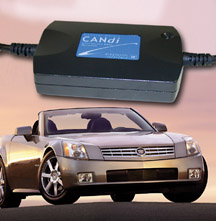
Now, starting with 2004, a new GMLAN (Local Area Network) system is being introduced. It will appear first on the Saturn Ion and 2004 Cadillac XLR, and will eventually spread to other vehicle lines (fig. 1).


GMLAN is a reliable, cost effective, flexible, and modular way to handle information sharing between different electronic control units (ECUs) in the vehicle through the means of a family of serial communication buses.


While the domestic automakers were developing UART and Class 2, the European industry was developing a system that operates on the CAN (Controller Area Network) protocol. With the introduction of GMLAN, which also uses the CAN protocol, a common architecture now permits sharing of components from both sides of the ocean.


Some Features of GMLAN
The Class 2 system had only one baud rate -- data was all transmitted at a single speed.


Using the CAN protocol, GMLAN has two different communication links with different data baud rates available -- low speed and high speed.


GMLAN Low Speed Bus
This bus will be typically used for operator controlled functions (for instance, door lock, window motor, etc.) where the system response time requirements are on the order of 100 - 200 msec.


It uses a single wire (also referred to as single wire CAN or SWCAN).


GMLAN High Speed Bus
The high speed bus is typically used for sharing real-time data. Systems with these requirements are primarily powertrain and chassis devices (engine, transmission, brakes). This bus uses two wires, and operates at 500 kbps.


Because there is a common communications protocol on all buses, it’s easier to transfer data from one bus to another.


In the Class 2 system, state of health messages pass from module to module continually. This requires all of the modules to be continually “awake.”


In GMLAN, modules can remain asleep, in a low power state, until asked to perform. Some ECUs may be communicating while others are in low power state. Only those ECUs necessary to participate in a common function are required to be awake. In effect, communication between any collection (or sub-system) of ECUs can be started or stopped independently of any other collection.
GM Lan is the comminication interface used in our cars. when we hook up a scan tool to a vehicle, it communicates to various components through this system. for instance, if you were to install an aftermarket headunit in your vehicle, the scan tool would not be able to comminicate with the radio(obviously) with all new cars, every time i put a new radio in a vehicle at work, it needs to be programmed through out techline termianl using a program called TIS. it should not affect your cars operation but the system might throw a few codes, because each module in your vehicle comminicate to eachother. they actually send each other signals at set intervals to make sure they are capable of responding to confirm the system is operating correctly. the 'codes that it will set are just going to be "u" codes, which are just going to be communication codes. they 'should' not trigger any lights on your instrument cluster, and will not affect the way your car runs.


Present GMLAN Application
The 2004 Cadillac XLR and Saturn Ion use the GMLAN high speed bus for powertrain applications. Class 2 continues to be used for body and accessory controllers.


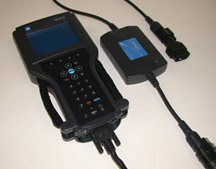
CANdi Module and Tech 2
Vehicles equipped with GMLAN require the use of a CANdi module for communication with the Tech 2. Class 2 data will pass through the CANdi module, so it can stay in place regardless of which protocol is being scanned.


The CANdi module (controller area network diagnostic interface) is installed in the data cable between the Tech 2 and the DLC (fig. 2).


The fact that GMLAN can operate at different baud rates enhances the efficiency of vehicle operation and communication. However, the Tech 2 snapshot display frame rate is unchanged.


TIP: Simultaneous to the introduction of the GMLAN is a new diagnostic process called Functional Diagnosis. Watch for more information on this in upcoming issues of TechLink.


Posted on Thursday, May 24, 2012 / 0 Comment / Read More

VoyagerRC Android Remote control via OBDII GMLAN

    Demonstration of VoyagerRC (Remote Control) controlling radio volume across a bluetooth connection using a custom OBD-II adapter to tap into the GMLAN network.

Posted on Wednesday, December 21, 2011 / 0 Comment / Read More
 
Copyright © 2011. CHEVROLET AFTERSALES . All Rights Reserved
Home | Company Info | Contact Us | Privacy policy | Term of use | Widget | Site map
Design by Herdiansyah . Published by Borneo Templates